

Healthcare billing systems fall into three primary categories: closed billing systems, open billing systems, and isolated billing systems. Closed systems integrate billing with other practice management functions in a single software platform, offering seamless data flow and unified workflows. Open systems allow integration with multiple third-party applications through APIs and interfaces, providing flexibility and customization. Isolated systems operate independently without integration capabilities, requiring manual data entry and separate management. Understanding these medical billing system types helps healthcare organizations select the right billing solution based on practice size, specialty requirements, budget constraints, and technology infrastructure needs.
Medical billing systems represent the technological backbone of healthcare revenue cycle management, enabling providers to submit claims, track payments, manage denials, and maintain financial records efficiently. The right billing software solution can dramatically impact practice profitability, cash flow, operational efficiency, and compliance with regulatory requirements.
Healthcare organizations face critical decisions when selecting billing technology platforms. The choice between different types of billing systems affects not only current operations but also future scalability, integration possibilities, and adaptation to evolving healthcare payment models.
This comprehensive guide explores the three different types of billing systems in healthcare, examining their characteristics, advantages, limitations, and ideal use cases. Whether you’re establishing a new practice, upgrading existing systems, or evaluating outsourced billing options, understanding these fundamental system architectures will inform better decision-making.
Before exploring specific billing system types, it’s essential to understand what constitutes a medical billing platform and how these systems function within the broader healthcare technology ecosystem.
Modern healthcare billing software manages multiple critical functions including patient registration and demographic data management, insurance eligibility verification, charge capture and entry, medical coding support, claims generation and submission, electronic remittance advice processing, payment posting and reconciliation, denial management and appeals, patient statement generation, accounts receivable management, and comprehensive reporting and analytics.
Healthcare billing solutions don’t operate in isolation. They must exchange data with electronic health records (EHR), practice management systems, clearinghouses, patient portals, payment processors, and revenue cycle analytics platforms. The degree and method of integration fundamentally defines the billing system type.
Healthcare billing technology has evolved from paper-based manual processes to sophisticated cloud-based platforms incorporating artificial intelligence, automation, and predictive analytics. Understanding this evolution helps contextualize why different system architectures exist and serve different organizational needs.
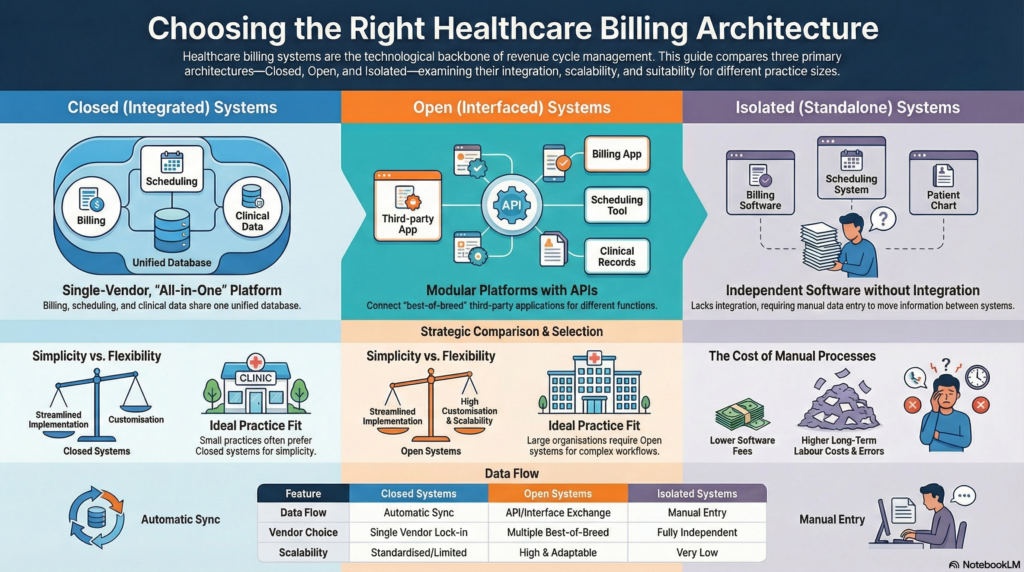
Closed billing systems, also called integrated medical billing systems, combine billing functionality with other practice management and clinical functions within a single unified software platform. These all-in-one healthcare solutions provide comprehensive practice management from a single vendor.
Unified Database Architecture: All practice data resides in a centralized database accessible by different modules including scheduling, clinical documentation, billing, and reporting. This single-source-of-truth approach eliminates data duplication and synchronization issues.
Vendor-Controlled Ecosystem: The software vendor controls all system components, updates, and integrations. Practices cannot easily substitute individual components with third-party alternatives without potentially losing functionality or data integrity.
Seamless Module Communication: Information flows automatically between modules without manual intervention or data transfer. Patient demographics entered during scheduling automatically populate billing records; clinical documentation automatically generates charge entries.
Standardized Workflows: Processes are designed around the vendor’s established workflows and best practices, offering limited customization options. Practices adapt their workflows to match system capabilities rather than customizing systems to match existing workflows.
Simplified Implementation: Single-vendor relationships streamline implementation, training, and support. One point of contact handles all technical issues, reducing finger-pointing between multiple vendors when problems arise.
Automatic Data Synchronization: Real-time data updates across all modules eliminate manual data entry and reduce errors. Changes made in one area instantly reflect throughout the system.
Reduced Technical Complexity: Practices don’t manage multiple software licenses, integration interfaces, or version compatibility issues. The vendor ensures all components work together seamlessly.
Predictable Costs: Bundled pricing for all functionality provides cost predictability. Practices know total software expenses upfront without surprise integration or interface fees.
Streamlined Updates: Software updates apply across all modules simultaneously, ensuring compatibility and often delivering new features across the entire platform.
Vendor Lock-In: Switching vendors requires replacing the entire system, not just billing components. This creates significant switching costs and vendor dependency.
Limited Flexibility: Practices cannot easily adopt best-of-breed solutions for specific functions. If the vendor’s scheduling module is excellent but billing module is mediocre, practices must accept both or replace the entire system.
Standardized Features: Specialty-specific needs may not be fully addressed if the vendor focuses on general practice requirements. Customization options are typically limited.
Scalability Constraints: As practices grow or change focus, the system may not adequately support new requirements, potentially necessitating complete system replacement.
Closed billing systems work best for small to medium-sized practices with straightforward billing requirements, limited IT resources and technical expertise, single specialty focus with standard workflows, preference for simplicity over customization, and practices seeking vendor-managed solutions minimizing internal technology management.
Many electronic health record vendors offer integrated billing within their platforms, including systems designed specifically for particular specialties or practice sizes. These unified solutions appeal to practices prioritizing ease of use and integrated workflows over flexibility and specialization.
Open billing systems, also known as interfaced or best-of-breed systems, operate as standalone billing platforms designed to integrate with other healthcare software through application programming interfaces (APIs), health level seven (HL7) interfaces, and other data exchange protocols.
Modular Architecture: Billing functions operate independently while exchanging data with other systems. Practices select specialized software for each function rather than accepting bundled all-in-one solutions.
Multiple Vendor Ecosystem: Different vendors provide scheduling, EHR, billing, patient engagement, and other solutions. These systems communicate through standardized interfaces and integration protocols.
Flexible Integration Options: Open systems support connections with various third-party applications, allowing practices to choose optimal solutions for each specific need.
API-First Design: Modern open systems prioritize robust application programming interfaces enabling developers to build custom integrations and extend functionality beyond native capabilities.
Best-of-Breed Selection: Practices choose the strongest solution for each function rather than compromising with a vendor’s weaker modules. This optimizes performance in each operational area.
Flexibility and Customization: Extensive configuration options and custom development possibilities allow systems to adapt to unique workflows and specialty requirements.
Easier Component Replacement: Dissatisfaction with one system component doesn’t require complete platform replacement. Individual modules can be swapped without disrupting other functions.
Vendor Competition Benefits: Multiple vendors competing for each system component drives innovation and keeps pricing competitive. Practices leverage vendor competition for better terms and features.
Scalability and Growth Support: As practices expand, add specialties, or change operational models, they can add or modify system components without wholesale replacement.
Integration Complexity: Connecting multiple systems requires technical expertise, ongoing maintenance, and troubleshooting when issues arise. Interface problems can disrupt operations.
Higher Implementation Costs: Integration development, interface licensing, and implementation services add significant upfront costs beyond base software expenses.
Multiple Vendor Coordination: Problems may require coordination between multiple vendors to identify and resolve issues, creating potential delays and finger-pointing.
Data Synchronization Challenges: Information may not flow in real-time between systems, creating temporary inconsistencies or requiring manual reconciliation.
Ongoing Maintenance Requirements: Updates to one system may break integrations with others, requiring ongoing interface maintenance and version management.
Open billing systems suit larger practices and healthcare organizations with dedicated IT resources, specialty-specific requirements not met by general platforms, practices already invested in specific EHR or practice management systems, organizations requiring extensive customization and workflow flexibility, and multi-specialty groups needing different solutions for different departments.
Successful open system implementations rely on standardized data exchange protocols including HL7 messaging for clinical and administrative data, Fast Healthcare Interoperability Resources (FHIR) for modern API-based integration, X12 EDI standards for claims and remittance data, and custom APIs for vendor-specific connections.
Many specialized medical billing software solutions operate as open systems, offering robust integration capabilities with major EHR platforms. These systems often provide advanced billing features, sophisticated denial management, and comprehensive revenue cycle analytics exceeding capabilities of integrated systems.
Isolated billing systems, sometimes called standalone billing systems, operate independently without integration capabilities or data exchange with other healthcare software. These legacy billing platforms require manual data entry and management separate from clinical and operational systems.
Complete Independence: The billing system operates entirely separately from practice management, EHR, and other software. No automated data exchange occurs between systems.
Manual Data Transfer: Information must be manually entered into the billing system from other sources. Demographics, insurance details, and charge information require duplicate entry.
Self-Contained Databases: All billing data resides exclusively within the billing system without connection to external databases or applications.
Limited External Communication: While these systems may submit claims electronically through clearinghouses, they don’t exchange operational data with other practice systems.
Simplicity and Independence: These systems operate without complex integrations, technical dependencies, or coordination with other vendors. Straightforward functionality appeals to practices with basic needs.
Lower Initial Costs: Without integration requirements or additional licensing, upfront costs may be lower than integrated or interfaced alternatives.
Proven Reliability: Many isolated systems represent mature, stable software that has operated reliably for years without significant changes or updates.
No Integration Maintenance: Practices avoid ongoing interface maintenance, troubleshooting, and version compatibility issues associated with integrated environments.
Duplicate Data Entry: Manual entry of information already existing in other systems wastes staff time and introduces transcription errors. Demographics, insurance details, and service information must be entered multiple times.
Increased Error Rates: Manual processes generate higher error rates than automated data transfer, resulting in claim denials and payment delays.
Limited Efficiency: Without automated workflows and data exchange, billing processes require more manual intervention and staff oversight.
Outdated Technology: Many isolated systems represent legacy software lacking modern features like patient portals, automated eligibility verification, or sophisticated analytics.
Poor Practice Visibility: Information fragmentation across disconnected systems prevents comprehensive operational oversight and integrated reporting.
Isolated billing systems primarily serve very small practices with minimal volume, practices with simple billing needs and limited payer diversity, organizations with established workflows built around manual processes, situations where modern alternatives aren’t available or affordable, and temporary solutions during system transitions.
Healthcare technology advancement has made isolated billing systems increasingly obsolete. Most modern practices require integrated data flow, automated processes, and comprehensive visibility impossible with standalone solutions. While some isolated systems remain in use due to familiarity or budgetary constraints, industry trends strongly favor integrated or interfaced approaches.
Understanding the key differences between closed, open, and isolated billing system types helps healthcare organizations make informed technology decisions.
Closed systems offer internal integration across vendor modules but limited external connectivity. Open systems excel at external integration with multiple third-party applications. Isolated systems provide no integration, requiring manual data management.
Closed systems typically offer the simplest implementation with single-vendor management. Open systems involve more complex implementation requiring integration development and multiple vendor coordination. Isolated systems are simple to implement but create operational complexity through manual processes.
Closed systems feature bundled pricing with predictable costs. Open systems involve higher upfront integration costs but potentially lower long-term expenses through competitive vendor pricing. Isolated systems may have lower software costs but higher labor costs from manual processes.
Closed systems offer limited customization within vendor-defined parameters. Open systems provide extensive flexibility and customization options. Isolated systems offer no flexibility beyond their built-in features.
Closed systems require minimal maintenance with vendor-managed updates. Open systems demand ongoing interface maintenance and version management. Isolated systems need minimal technical maintenance but substantial manual process management.
Selecting appropriate billing software architecture requires careful evaluation of multiple factors specific to your organization.
Small Practices (1-5 Providers): Often benefit from closed systems offering simplicity, affordability, and ease of use. Limited IT resources make vendor-managed solutions attractive.
Medium Practices (6-20 Providers): May leverage either closed or open systems depending on specialty requirements and customization needs. Growing practices should prioritize scalability.
Large Practices and Healthcare Systems (20+ Providers): Typically require open systems providing flexibility, best-of-breed capabilities, and customization supporting complex operations.
General practice requirements are often well-served by closed systems with standard workflows. Specialized practices in areas like radiology, pathology, behavioral health, or surgery may require open systems supporting specialty-specific billing rules, coding requirements, and workflow nuances.
Practices with dedicated IT staff can manage open system complexity and integration maintenance. Organizations lacking technical expertise should consider closed systems or outsourced billing arrangements minimizing internal technology management.
Evaluate total cost of ownership including software licensing, implementation services, integration development, ongoing maintenance, and staff training. Lower upfront costs may be offset by higher operational expenses or reduced efficiency.
Consider future expansion, additional locations, new specialties, and evolving service lines. Systems supporting current needs but constraining future growth create expensive replacement cycles.
Practices already using specific EHR or practice management systems should evaluate billing solutions offering strong integration with existing platforms, potentially favoring open systems over complete platform replacement.
Medical billing technology continues evolving, introducing new capabilities and approaches beyond traditional system categories.
Software-as-a-service (SaaS) billing solutions eliminate local server requirements, provide automatic updates, enable remote access, and offer subscription-based pricing. Cloud systems can be closed, open, or hybrid architectures depending on vendor approach.
AI-powered billing systems offer automated coding suggestions, predictive denial analytics, intelligent claim scrubbing, automated payment posting, and optimization recommendations based on pattern recognition across large datasets.
Comprehensive RCM platforms extend beyond traditional billing to encompass patient access, clinical documentation improvement, analytics, and patient financial engagement tools within unified ecosystems.
Emerging blockchain technologies promise secure, transparent claims processing, streamlined prior authorization, and automated payment settlement potentially transforming billing system architecture fundamentally.
Federal regulations promoting healthcare data exchange push vendors toward more open architectures supporting standardized interfaces and patient data access, potentially blurring distinctions between traditionally closed and open systems.
Successful billing system implementation requires careful planning regardless of system type selected.
Document current workflows, pain points, reporting needs, integration requirements, and future growth plans before evaluating solutions. Clear requirements prevent expensive mismatches between system capabilities and organizational needs.
Assess vendor financial stability, customer references, implementation track record, support quality, product roadmap, and long-term viability. Technology decisions often represent multi-year commitments.
Develop detailed project plans covering data migration, staff training, workflow redesign, testing protocols, and go-live support. Allocate adequate time and resources for proper implementation.
Address staff concerns, provide comprehensive training, designate super-users supporting adoption, and celebrate early wins demonstrating system benefits. Resistance to change undermines even excellent technology.
Establish baseline metrics before implementation and track performance post-launch. Monitor key performance indicators including claim submission lag, first-pass acceptance rates, denial rates, days in accounts receivable, and collection rates to validate system effectiveness.
Many practices find that outsourcing medical billing offers advantages beyond system type considerations. Professional revenue cycle management companies provide expertise, technology, and processes exceeding in-house capabilities regardless of practice size.
Specialized billing firms employ certified coders, experienced billing specialists, and denial management experts focused exclusively on revenue optimization. They invest in advanced billing technology, automation tools, and analytics platforms that would be cost-prohibitive for individual practices. Outsourcing converts fixed billing department costs to variable costs based on collections, improving financial flexibility.
Professional billing services typically utilize sophisticated open billing systems integrated with major EHR platforms through established interfaces. They maintain these integrations, manage system updates, and troubleshoot technical issues, eliminating technology burdens from practice staff.
Practices benefit from advanced billing technology without direct investment, implementation complexity, or ongoing maintenance responsibilities. This proves particularly valuable for practices lacking technical resources to manage integrated or interfaced billing systems effectively.
Maximizing billing system effectiveness requires ongoing attention regardless of system type.
Maintain accurate patient demographics, current insurance information, and complete documentation. Poor data quality undermines even the most sophisticated billing systems.
Regularly review and refine billing workflows eliminating unnecessary steps, automating repetitive tasks, and ensuring staff follow established processes consistently.
Provide initial and ongoing training ensuring staff fully utilize system capabilities. Many practices never realize full return on billing technology investment due to inadequate training.
Monitor which features are used, identify underutilized capabilities providing value, and ensure staff leverage available tools effectively.
Compare your results against industry benchmarks and best practices, identifying improvement opportunities and validating system effectiveness.
Practices sometimes need to transition from one billing system type to another as circumstances change.
System migrations require careful planning including data extraction from old systems, data cleansing and validation, mapping to new system structures, parallel testing, cutover planning, and contingency procedures for potential issues.
Maintain claims submission during transitions, ensuring cash flow continuity. Plan migrations during slower periods when possible, and ensure adequate staff resources for dual system operation during transition phases.
Document lessons learned during system changes, identifying what worked well and what could improve in future technology initiatives.
All billing system types must support compliance with healthcare regulations regardless of architecture.
Billing systems must maintain appropriate security controls protecting patient financial information, audit trails documenting system access and changes, business associate agreements with vendors, and policies governing data use and disclosure.
Systems should support accurate coding through edit checks, modifier guidance, documentation requirements, and audit trails demonstrating coding rationale.
Billing platforms must accommodate payer-specific submission requirements, format specifications, and documentation needs varying across commercial, Medicare, Medicaid, and other payers.
Healthcare technology evolves rapidly, making future adaptability an important selection criterion.
Evaluate whether systems can grow with your practice, support volume increases, accommodate additional providers and locations, and adapt to new service lines or specialties.
Understand vendors’ development priorities, planned features and enhancements, technology platform evolution, and commitment to ongoing innovation.
Select vendors demonstrating awareness of healthcare trends, value-based payment model support, interoperability commitment, and emerging technology adoption.
The three different types of billing systems in healthcare—closed, open, and isolated systems—each serve distinct needs within the medical billing landscape. Closed systems offer integrated simplicity ideal for smaller practices seeking vendor-managed solutions. Open systems provide flexibility and best-of-breed capabilities suited to larger organizations with complex requirements. Isolated systems, while declining in prevalence, still serve niche applications where simplicity outweighs integration benefits.
Selecting the appropriate billing system type requires careful evaluation of practice size, specialty requirements, technical resources, budget parameters, and growth plans. No single system type universally suits all healthcare organizations. The optimal choice depends on your specific circumstances, priorities, and strategic direction.
Modern healthcare billing extends beyond software selection to encompass comprehensive revenue cycle management addressing people, processes, and technology holistically. Whether you choose closed, open, or isolated billing systems—or partner with professional billing services managing technology on your behalf—focus on achieving measurable improvements in claim acceptance rates, denial reduction, collection optimization, and operational efficiency.

Healthcare Billing Services is a full-service medical billing company, managing everything from coding and claims to payment and follow-up. Our expertise ensures accurate, efficient billing for practices of any size or specialty, so you can focus entirely on patient care.